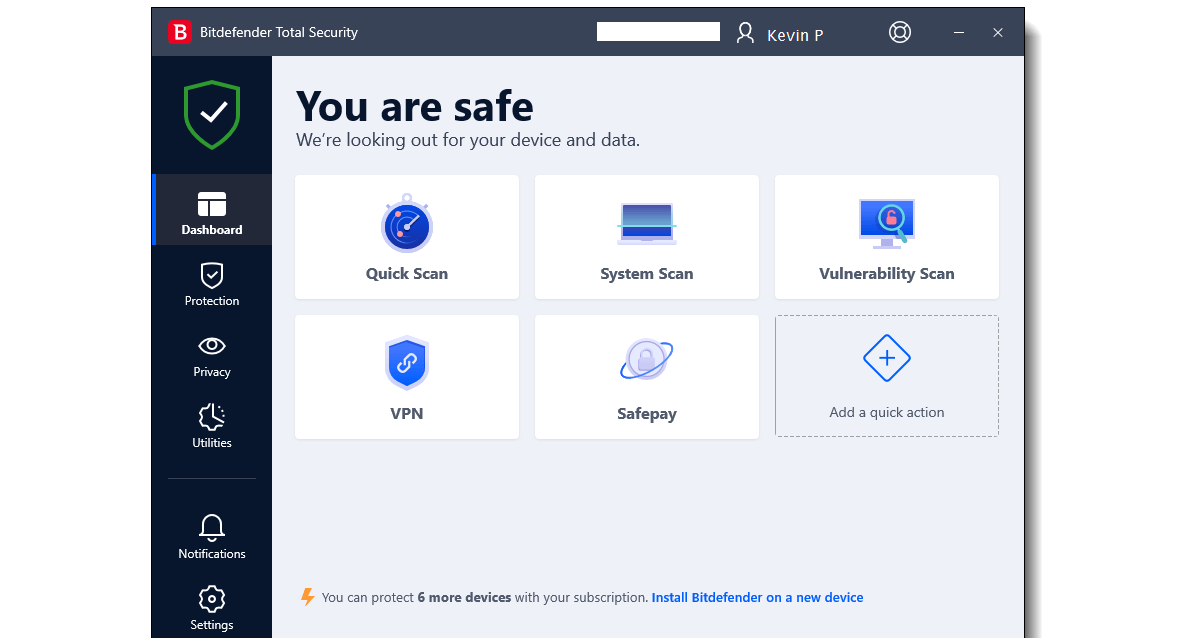
Why Use Bitdefender Total Security?
Using Bitdefender Total Security for Windows PC is the best way to provide the most advanced protection to your PC. It is an award-winning PC security software that is considered as one of the most trusted and reliable PC security products in the world. It provides comprehensive advanced threat protection to your PC to eliminate all security threats. The latest Bitdefender Total Security offline installer is now available for download for Windows PC. The links to get Bitdefender Total Security for Windows 11, 10, and 7 (32 and 64-bit) PC are listed below.
Antivirus software is the most essential piece of software for a computer or a smartphone. It helps us to keep our devices safe and secure from various malware, viruses, or other dangerous threats. When it comes to trustworthy and reliable security software for our PC or smartphone, Bitdefender is the name that comes first, which is the total security solution for our devices.
If you want to use this antivirus on your PC, you can download Bitdefender Total Security offline installer from its official site for Windows 11, 10, and Windows 7 PC, through the links shared at the end of the post.
Image Source: Bitdefender
This new version of Bitdefender includes all the necessary security features for better performance and provides enhanced protection to keep your devices safe from viruses, malicious programs, cyberattacks, and more.
Key Features of Bitdefender Total Security
Bitdefender is highly regarded for its minimal impact on system resources while providing maximum security. Here are the standout features that make it a top choice for Windows users:
- Powerful Firewall: It provides a strong Firewall to protect your computer by preventing the transmission of viruses and malware through a public network, internet, email, etc. It acts as a two-way shield, monitoring both incoming and outgoing traffic to block unauthorized access attempts.
- Anti-Malware Engine: Anti-malware protection to keep your device safe and disinfected from malware, viruses, spyware, etc. This engine utilizes machine learning and cloud-based scanning to detect both known and emerging “zero-day” threats without slowing down your PC.
- Multi-Layer Ransomware Protection: Multi-layer protection against ransomware. Nowadays, Ransomware is one of the most dangerous cyber attacks. Ransomware is now a technique used by cybercriminals to demand payment or ransom from a victim by encrypting the victim’s computer data and files. However, the new Bitdefender Total Security provides multi-layer protection against ransomware. This includes automated file rollback, which can restore your precious documents and photos if a malicious process attempts to encrypt them.
- Network Threat Prevention: Network Threat Prevention is another new feature of Bitdefender TS to identify and prevent suspicious network-level activities and also to block modern exploits, malware, etc. It analyzes your network traffic to intercept brute-force attacks and botnet-related communications before they hit your machine.
- Anti-Theft Suite: The anti-theft feature allows you to access your Windows Laptop or Tablet anywhere remotely through your Bitdefender Central account. You can locate, lock, or even wipe your device remotely if it is lost or stolen.
- Advanced Anti-Phishing & Scam Detection: The anti-phishing feature blocks phishing websites and URLs to protect your data. This now includes Bitdefender Scamio, a next-gen AI-powered tool that analyzes suspicious links, messages, and emails to warn you of potential scams in real-time.
- Rescue Environment: The Rescue mode is another of the best features of Bitdefender Total Security software. Some very intelligent viruses and rootkits cannot be removed in normal mode. Therefore, the Rescue mode reboots your computer if Bitdefender detects such a dangerous program and reboots the system in Rescue Mode to clean up the threats and restore your system.
- Vulnerability Assessment: With a single click, Bitdefender scans your PC for outdated software, missing Windows security patches, and unsafe system settings, helping you “harden” your computer against potential entry points for hackers.
- Cryptomining Protection: Protect your hardware performance by blocking “leech” software that secretly uses your computer’s resources to mine cryptocurrency without your consent.
- Privacy & Optimization Tools: Along with these advanced features, Bitdefender Total Security also provides many other very essential security features like parental control, browser sandbox, password manager, Free VPN, different work modes (Game, Movie, and Work Modes), Webcam Protection, File Encryption, Password Manager, File Shredder and many more.
Along with these advanced features, Bitdefender Total Security also provides many other very essential security features like parental control, browser sandbox, password manager, Free VPN, different work modes (Game, Movie, and Work Modes), Webcam Protection, File Encryption, Password Manager, File Shredder and many more.
Technical Specifications
Details of Software:
- Name: Bitdefender Total Security
- Category: PC Security / Antivirus
- Developer: Bitdefender
- Version: 27.0.60.341
- OS Support: Windows 7 (SP1), Windows 10, Windows 11
- Platform: Windows 32-bit and 64-bit PC
- Installer Type: Offline Installer
- Best alternative: Kaspersky Total Security
[Related Software]
Avast Premium Security Free Download

Download Bitdefender Total Security Offline Installer
Bitdefender Total Security 64-bit
(Size: 837 MB)
Bitdefender Total Security 32-bit
(Size: 774 MB)
Or get the online installer here (Size: 21 MB).
Conclusion:
Using Bitdefender Total Security is the most reliable way to find and remove any viruses, modern exploits, malware, etc on your PC. Along with a powerful antivirus engine, it also offers a strong Firewall and many other important security features to protect your devices. Free download Bitdefender offline installer for Windows PC today and install it directly on any supported PC.