Download the old version of Shotcut for Windows 7 PC and enjoy the best open-source all-in-one video editor that comes with many essential video editing features. These tools and features help you produce stunning, professional-grade videos easily. Shotcut for Windows 7 is an open-source, free video editor that allows easy editing of videos on your old Windows 7 PC. It lets you perform video editing tasks very smoothly and also allows you to use several built-in video editing tools.
Using the Shotcut video editor, you can cut, trim, join video clips, add effects to videos, make movies, create slide shows by importing images, etc. For Windows 7 64-bit, you need to download Shotcut 22.12 and for Windows 7 32-bit, you need version 20.09.27.
It supports importing almost all types of video formats and also allows you to produce videos in different formats. Shotcut is available for both Windows 7 32-bit and 64-bit computers. Free Download Shotcut for Windows 7 PC for a powerful free video editing software and start editing like a pro now.

Does Shotcut Support Windows 7?
As Microsoft has abandoned Windows 7, it has not received any new updates since January 2020 and will not receive any in the future. Therefore, most new software applications do not support the old Windows 7 PC. So it is important to verify whether an application supports the old OS or not. In the case of Shotcut, Windows 7 does not support the latest releases, and these are only available for the latest Windows version. However, the best available option is that you have to download and install an older version of Shotcut that supports Windows 7 and Windows 8 PCs.
So, yes, Shotcut supports Windows 7 and Windows 8 PC, but till version 20.09 (for 32-bit PC) and 22.12 (for Windows 64-bit PC). The last supported version of Shotcut 32-bit for Windows 7 is version 20.09, and Shotcut 64-bit for Windows 7 is version 22.12. Any version released after these versions does not support Windows 7 and 8 PC.
Key Features of Shotcut Video Editor
The following are the key features of Shotcut:
- Native Editing without Importing Files: Shotcut allows you to work directly with your media files without importing them, whereas many other video editors need to import files before editing.
- Support for the Latest Audio, Video, and Image Formats: Shotcut supports almost all major video and audio formats — including MP4, MOV, AVI, MKV, MP3, AAC, and many others. It also allows importing and editing a wide range of image types such as BMP, GIF, JPEG, PNG, SVG, TGA, TIFF, and WebP.
- Frame-Accurate Seeking: Shotcut lets you move through your video frame by frame. It is helpful when trimming or syncing video and audio perfectly.
- Webcam and Audio Capture: Shotcut allows you to record video and audio directly from your webcam and microphone. This feature is handy for creating tutorials, commentaries, or reaction videos.
- 4K Resolution Support: Shotcut fully supports 4K videos, allowing you to edit high-resolution footage without quality loss.
- Network Stream Playback: You can open and play live video streams or online media directly from the web using protocols like HTTP, HLS, RTMP, RTSP, MMS, and UDP, allowing you to preview or capture online broadcasts.
- Frei0r Video Generator Plugins: Shotcut includes support for Frei0r plugins, which are small tools that generate effects such as color bars, plasma, and more. These can be used for testing, creative intros, or background visuals.
- Built-in Generators: It offers simple generators for color backgrounds, text overlays, noise effects, and counters.
- Export Single Frame or Image Sequence: Shotcut lets you save any frame from your video as an image or export an entire video as a series of images.
- Alpha Channel Support: You can work with videos that have transparent backgrounds (alpha channels) and also export them in formats that preserve transparency. This is useful for overlays, intros, or green-screen effects.
Interface of Shotcut
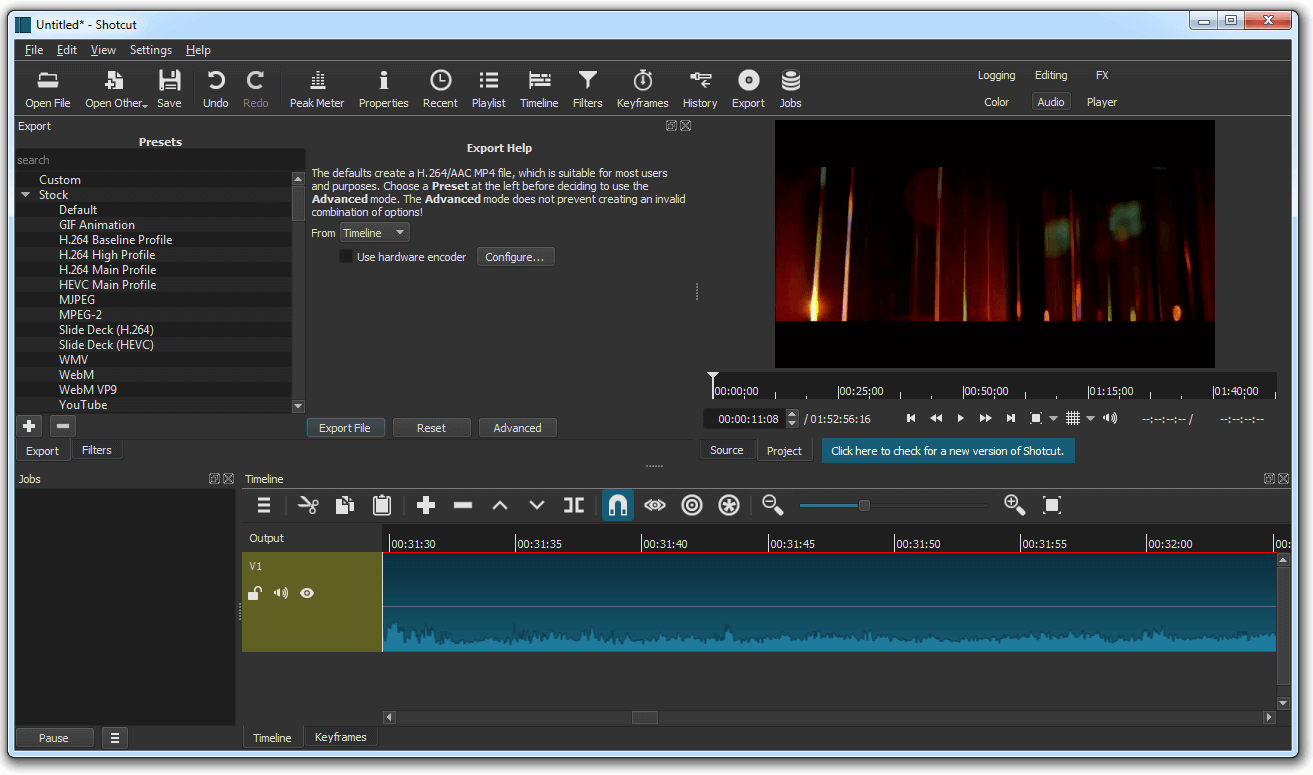
The interface of Shotcut is a bit clunky compared to some other modern video editors, which might make it slightly challenging for new users to get used to. Beginners may find it a little confusing at first when trying to navigate through the menus, panels, and editing tools. However, once you have used it for some time, exploring its layout and features, it becomes easier to understand and use for most video editing tasks.
Should I download Shotcut 64-bit and 32-bit?
Shotcut provides different offline installers for both Windows 32-bit and 64-bit PC. If your PC has a 32-bit architecture or a 32-bit CPU, then you need to download the Shotcut 32-bit installer. A 32-bit CPU does not support an app designed for a 64-bit CPU. And if you have a 64-bit CPU, then you need to download the 64-bit version of a software application. But, a 64-bit CPU with a 64-bit operating system can generally support and run 32-bit software.
Download Shotcut for Windows 7 PC
Download the required version of the Shotcut video editor for Windows 7 32-bit and 64-bit PC, as per the CPU of your PC, from below, just after the technical details.
Technical Details
- Developer: Meltytech, LLC.
- Website: shotcut.org
- License: Free (Open Source)
- Category: Multimedia/Video Editor
- Installer Type: Standalone offline installer
- OS Support: Windows 7, 8, 10, and 11 (Legacy versions for Windows 7)
- Version: 22.12 for 64-bit and 20.09.27 for 32-bit (for Windows 7)
Get Shotcut 64-bit, Size: 99.3 MB
Get Shotcut 32-bit, Size: 80 MB
If you need the latest version for Windows 10 and Windows 11 PC, you can get it using the link below:
Frequently Asked Questions
Does Shotcut work on Windows 7?
Yes, Shotcut supports Windows 7, but only up to version 20.09 for 32-bit systems and version 22.12 for 64-bit systems. Newer versions dropped support for Windows 7.
Is Shotcut free to use?
Yes, Shotcut is a completely free, open-source video editor available for Windows, macOS, and Linux.
Does Shotcut support 4K video editing?
Yes, Shotcut fully supports 4K resolution video editing and allows you to process high-definition footage without quality loss.
Conclusion
Shotcut is one of the best free alternatives to premium video editing programs. It comes with many useful professional-grade video editing tools and features that make it a better video editor among the rest. It is an open-source, free, and cross-platform program that is available for Windows, Mac, and Linux. To download Shotcut for Windows 7 for use in this old PC, you have to choose an older supported version of Shotcut, because the latest versions do not support Windows 7 and 8 PC. You can download the latest compatible version of this program for Windows 7 from above. Download Shotcut for Windows 7 PC and start using it for free.